AVG Cleaner - Storage Cleaner26.16.1
Publisher Description
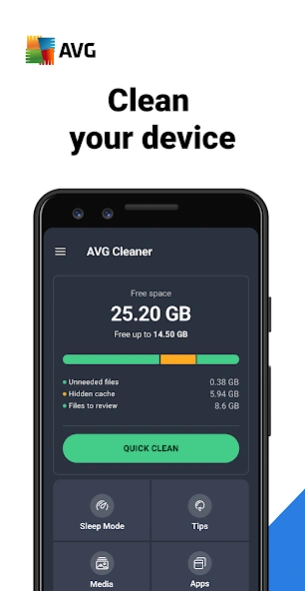


Clean your phone and remove hidden junk from storage with our master cleaner app
AVG Cleaner is cleaning tool that has let nearly 50 million people worldwide clean their devices.
AVG Cleaner top features:
✔
Uninstall Updates of Preinstalled Apps:
replace preinstalled bloatware apps you don't use with factory versions to save space
✔
Get more space
- Remove junk files, uninstall apps, and delete bad or unwanted photos and videos
✔
System info
- Everything you need to know about your phone on one screen
✔
File manager
- Smart File Manager & Storage Cleaner can analyze pictures, files, and apps
✔
Junk Cleaner
- Clean out any useless junk from your device e.g. app data
With AVG Cleaner, you will get rid of junk files, and automatically find bad quality or duplicate photos
AVG Cleaner – Storage Cleaner is a clean up tool that gives you more storage space
Junk cleaner, storage clean up, and app removal features are described below:
Cleaner: Advanced app remover & app manager:
► App analyzer: AVG Cleaner can identify apps that drain mobile data, or take up too much storage space, allowing you to clean them out more easily
► App remover: Easily remove apps to get more storage space
► Junk cleaner: Master junk files and leftover data
► Easily analyze apps based on storage, ram, battery, data consumption or usage
Cleaner: Photo Analyzer
:
► Find bad quality or duplicate photos
► Easily clean your photo library
Cleaner: 1-tap Analysis
► Clean your device with a single tap of a button
► Perform device scan and analysis with just one tap
Media Overview
• Access Image Analysis results
• Sorted media by source folders
• All large video files in one view
App Overview
• Draining apps analysis
• Usage statistics
• App size growth analysis
• Notification analysis
Clean your phone to free up storage space. Eliminate junk, delete bad quality, similar or duplicate photos to make more storage space available for the apps, photos, and other stuff you want.
By installing this app, you agree that your use of it is governed by these terms: http://m.avg.com/terms
This app uses Accessibility permission to assist disabled and other users stop all background apps with just one tap.
Download AVG Cleaner – Storage Cleaner for Android™ phones NOW
About AVG Cleaner - Storage Cleaner
The company that develops AVG Cleaner - Storage Cleaner is AVG Mobile. The latest version released by its developer is 26.16.1. This app was rated by 2 users of our site and has an average rating of 5.0.
To install AVG Cleaner - Storage Cleaner on your Android device, just click the green Continue To App button above to start the installation process. The app is listed on our website since 2026-09-03 and was downloaded 176 times. We have already checked if the download link is safe, however for your own protection we recommend that you scan the downloaded app with your antivirus. Your antivirus may detect the AVG Cleaner - Storage Cleaner as malware if the download link to com.avg.cleaner is broken.
How to install AVG Cleaner - Storage Cleaner on your Android device:
- Click on the Continue To App button on our website. This will redirect you to Google Play.
- Once the AVG Cleaner - Storage Cleaner is shown in the Google Play listing of your Android device, you can start its download and installation. Tap on the Install button located below the search bar and to the right of the app icon.
- A pop-up window with the permissions required by AVG Cleaner - Storage Cleaner will be shown. Click on Accept to continue the process.
- AVG Cleaner - Storage Cleaner will be downloaded onto your device, displaying a progress. Once the download completes, the installation will start and you'll get a notification after the installation is finished.
Program Details
System requirements
Download information
Pricing
Version History
version 26.16.1
posted on 2026-09-03
version 25.15.0
posted on 2025-10-15
We are always working to maintain this app in tip top shape and improve its functionalities. To learn details about the most important recent changes, please open the app and navigate to "What's new" screen. It can be directly accessed from the main menu. Thank you for using our app!
version
posted on 2021-12-08
Improved options on My subscription screen.
version
posted on 2021-10-13
Unleash the full power of our deep storage scanner with new filters. Go to any list of apps or files, tap the new customization icon above items and have fun looking at your storage content in any way you need.
New mini-FAQs: If you are interested to learn more details about either Long-Term Boost or Deep Clean functionality, interact with them to learn about how we do stuff.
version
posted on 2021-06-01
- Faster scan and navigation - move through app screens and get the job done way quicker!
- Many accessibility improvements and fixes for our visually impaired users.
version
posted on 2021-02-15
Bug fixes and stability improvements.
version
posted on 2020-12-21
Go to individual app screens to find out new details about any individual media folders or data.
version 5.1.2
posted on 2020-10-28
* New: Supporting system wide dark mode (A10 users)
* Plus: Better Tips UI and many more improvements
version 5.1.1
posted on 2020-08-28
Support of system-wide dark theme. If your device has this functionality, navigate to "hamburger" menu / Themes, select "System" and confirm to activate it. Whenever you change your system theme, the app will match it. Enjoy!
version 5.0.0
posted on 2020-08-18
A new shiny design.
